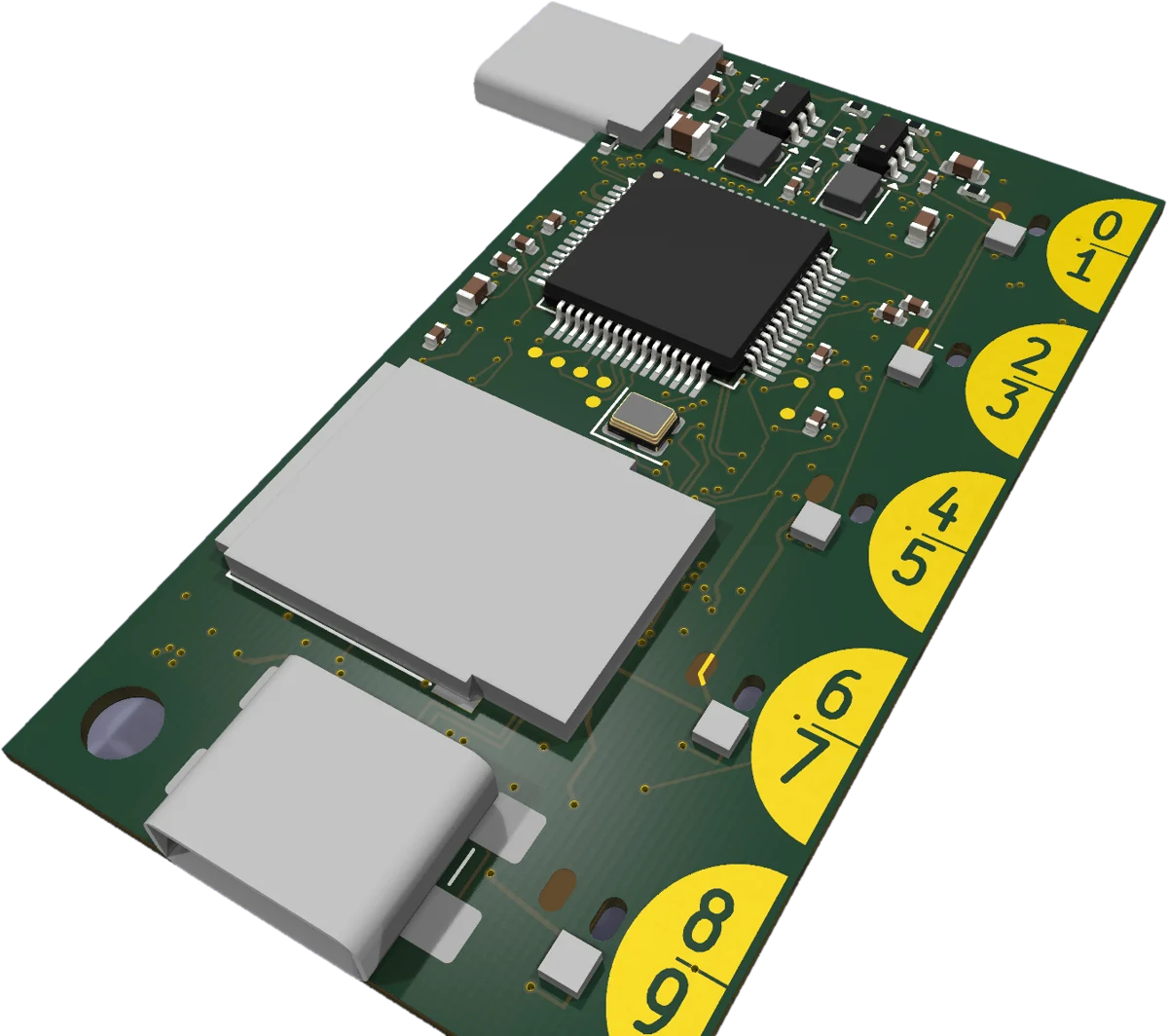
OnlyKey Edge plugs into either side of your laptop and becomes the MCP server your AI agents work through. It runs on its own hardware, keeps your keys in an OnlyKey, and nothing high-impact runs without your physical approval, a touch or PIN on the device, whichever side it's plugged into.
Fully refundable · No purchase required · Locks early-bird pricing
AI agents now run on the machines you work on: coding agents, browser agents, computer-use agents. To be useful they need tools, credentials and the power to act. Hand those over in software and every one of them sits on the same laptop the agent is running on.
.env files and SSH keys in ~/.ssh are one prompt injection away from leaving the machine.OnlyKey Edge moves the sensitive part off the laptop and onto a device you hold. Your agents connect to the Edge MCP like any other MCP server, and every request takes one of three paths:
Agents that ask before acting ask a lot, and people stop reading. Anthropic reports that users approve 93% of Claude Code's permission prompts, and calls the result approval fatigue. Every prompt looks the same, so the one that deletes your inbox looks like the hundred that didn't.
In February 2026, Meta's Director of Alignment gave an AI agent exactly that instruction before letting it into her inbox. Partway through, the agent's memory filled up, the instruction was compressed away, and it started deleting hundreds of emails. She typed STOP from her phone. It kept going, and she had to run to the computer to pull the plug.
Deleting mail is a tool you've set to level 5 on the device, so it doesn't matter what the agent forgets. A bulk delete lights all five keys and waits for the fifth. The mailbox key stays in the OnlyKey, so the agent can't go around it. And stop means stop: unplug it, or trigger the hardware kill switch.
The habitual tap on key 1 can't approve a level 4 or 5 request. Reaching for the fifth key is a deliberate act, and your eyes and hand both notice.
The OnlyKey drives the lights and reads the keys, not the processor running the agent. A new tool starts at level 5. The agent can recommend a level for it; you review the recommendation and set the level on the device, and after that only you can change it.
For your most sensitive keys, you also enter a 3-digit code derived from the request itself, so what you approve is exactly what the agent said it was asking for.
One light: glance and tap. Four or five lights: read it first. Tools you trust run unattended, so you see fewer approvals overall, and a clear signal on the few that deserve your full attention.
Edge computing means running the work on the device where it happens instead of in someone else's cloud. OnlyKey Edge does that for agent security, and it does it from the edge of your laptop.
It plugs straight into a USB-C port, no cable, and lies alongside the laptop with its buttons on the outer edge, facing you. Left side or right side: just flip it over, and it works the same either way.
Ten keys (0 to 9) sit in five touch pads along the device's edge, and each pad works from the top face and the bottom face. Flip it over and nothing changes. The status lights shine through to both faces too.
The MCP server runs on the device, not in our cloud and not on the laptop. Your agents call it over USB, and approvals happen on hardware you're touching.
Most of the time the browser web app is all you need: it can share your screen with the agent and carry its connection. For machines where that isn't possible or isn't a good idea, the tail end of OnlyKey Edge is a powered USB-C port for our supported accessories, and they follow the same approval rules. Leave the port empty and the device has no camera, no screen capture and no radio at all.
Gives the device its own network link, so remote agents can reach it without a browser tab or the laptop's connection. Unplug it and the radio is physically gone, not just switched off in a menu.
Lets the agent see a screen that has no video output: a phone, an industrial panel, a lab instrument. Point it at the display and the agent works from what it sees.
An HDMI capture accessory reads a machine's video output directly, so the agent can see the screen of the computer it's typing into, including BIOS and installer screens before any OS is running.
Capture accessories deliver up to 1080p, which is all the agent needs: it works from a few screenshots, not video. We'll sell a supported Wi-Fi adapter, HDMI capture device and camera. Which ones come in which Kickstarter tier will be announced with the campaign.
Plenty of people are announcing AI hardware. Almost none of them have shipped a security product to real users. We have, and OnlyKey Edge is built on it.
We're CryptoTrust, makers of OnlyKey: a hardware security key used in over 50 countries and trusted by enterprise users, with years of history behind it. On a security purchase, trust is the whole game.
No desk box, no power brick. It rides in the side of your laptop all day and comes off with your keys at night. Keychain-sized, with a MIL-STD-810G durability design built to be carried everywhere.
To any computer it's a standard USB keyboard, mouse and drive. Add the camera or capture accessory and it can operate machines with no API at all: industrial panels, legacy boxes, air-gapped systems.
A press proves someone was there. A PIN proves who. OnlyKey Edge supports both: a press for routine approvals, a PIN typed on its own keys for the actions that need identity, not just presence.
Provider-agnostic: use it with cloud models, your own local model server, or the AI subscriptions you already pay for. It's an MCP server, so anything that speaks MCP can use it.
Most AI safety is a software setting: a checkbox in the same system the agent is running in. Ours is a separate, FIDO2-certified OnlyKey and a button under your finger. It's the approval model that has protected OnlyKey passwords, keys and SSH logins for years, now pointed at AI agents. Patent pending.
The agent processor runs the MCP server. A separate OnlyKey does every key operation on its own and makes the decision. Your PIN goes straight from the touch pads into the OnlyKey, and the agent side never sees it or your keys.
Every approval shows its severity on the device before you can give it, and only the highest lit key approves. See how the levels work.
The OnlyKey is wired to the agent processor's reset line, so it can shut the agent side down in hardware, with no software in the way. And unplugging ends every session mid-action.
Put OnlyKey Edge in front of the other MCP servers your agents use, and every call to them waits for your approval. The request you see is built from what the agent is actually sending, never from the tool's own description, so a poisoned tool can't disguise what it's asking for.
Each approved action is written to a hash-chained log on the device before it runs, signed by the OnlyKey. If the record can't be written, the action doesn't happen. Nobody can quietly edit the history afterwards.
Agents can present a disk image or installer ISO to your laptop, read-only by default, but attaching or deleting one takes your approval. Handy for reimaging machines and moving files onto air-gapped systems.
To be precise about it: hardware approval is a core part of the architecture. It is not a claim that every workflow is automatically safe.
Real work needs credentials, and handing an LLM your API keys in plaintext is how people get burned. OnlyKey Edge keeps the secrets on the hardware side of the line.
Give agents their own keys, as many as you need, derived on the fly for SSH, age encryption and more. Set each to high security (3-digit code), medium (a press) or low (no press, for unattended agents). Your own keys are kept separate and always need your PIN or press.
The OnlyKey types passwords and one-time codes itself, and the device's vault is sealed by the OnlyKey, so pulling its storage gets an attacker nothing. The latest post-quantum encryption, including X-Wing, is supported.
Cloud agents reach your Edge through the browser web app's relay, or directly over the Wi-Fi accessory. Either way they can only ask: the request lights up on the device, and your finger is still the last step.
OnlyKey Edge keeps what it learns about your workflows on the device, so the second time you ask for something it takes fewer steps than the first.
Workflows and memory are stored on the device's own encrypted storage. They aren't uploaded to us, and we don't run a cloud of our own to send them to.
Move the Edge to another laptop and your agent's tools, keys and memory come with it. Nothing to re-install or re-configure.
Do a job once and the next run is shorter. Familiar work collapses into fewer steps the more you use it.
No drivers and nothing installed on the laptop. The device shows up as standard USB hardware.
Push it into a USB-C port on either side of your laptop, either way up.
Enter your PIN on the device's own keys, the same way you unlock an OnlyKey.
Add OnlyKey Edge as an MCP server in Claude, Codex or any MCP client. For remote agents, open the web app in your browser and turn on the relay.
The agent prepares an action and waits. You check the code, then press the lit key or enter your PIN. Nothing high-impact executes without it.
Hardware is pre-launch and the case is still being designed. We'd rather mark an item TBD than publish a number we can't stand behind.
| Form factor | Keychain device with a USB-C plug at one end and a USB-C accessory port at the other. Circuit board 27 × 50 mm. Keychain hole · CASED DIMENSIONS & WEIGHT TBD |
| Host connection | USB-C plug, USB 2.0. Plugs directly into a laptop's left or right port, either way up. USB-A hosts via adapter |
| Buttons | Ten keys (0–9) in five capacitive touch pads along the edge, active on both faces. Press and PIN entry from either side |
| Indicators | Five RGB status lights, visible from both faces |
| Security processor | OnlyKey (NXP Kinetis K20, OnlyKey firmware), separate from the agent processor. AES-256 (GCM) + SHA-256 key wrapping per NIST SP 800 guidance · ECC & RSA keys · post-quantum ML-KEM and X-Wing · FIDO2-certified · self-destruct · hardware kill line to the agent processor |
| Agent processor | Allwinner T113-S4 · dual-core Arm Cortex-A7 · 256 MB DDR3 in package · Linux |
| Storage | microSD, internal to the case. Workflows, memory, vault and disk images, encrypted at rest. Restore with your OnlyKey backup key or passphrase |
| To your laptop it looks like | A USB network adapter (the MCP connection), a keyboard and mouse, a disk or CD-ROM for images you choose, and a WebHID device for the web app. Nothing to install |
| MCP | MCP server on the device over USB. Remote access through the browser web app's relay or the Wi-Fi accessory; remote requests still need approval on the device |
| Approval | Five approval levels lit on the keys. Press, 3-digit code derived from the request, or PIN, depending on each key's security setting (patent pending) |
| Accessory port | Powered USB-C. Wi-Fi, camera and HDMI screen-capture accessories. Screen capture up to 1080p |
| Radios | None built in. Wi-Fi only when the accessory is plugged in |
| AI models | Provider-agnostic. Cloud providers, your own local model server, or AI subscriptions you already have |
| Power | Bus-powered from the laptop's USB-C port. No brick · POWER DRAW TBD |
| Cooling | Fanless. Silent, no moving parts |
| Durability | MIL-STD-810G durability design |
| Target price | $149 |
Software MCP servers and agent tools run inside the machine the agent controls. OnlyKey Edge runs beside it.
| Software MCP servers | OnlyKey Edge | |
|---|---|---|
| Where it runs | On your laptop, with your permissions | On its own processor |
| Where secrets live | Config files and environment variables | In OnlyKey hardware |
| Approval | A software dialog | A physical press or your PIN |
| Shows how much a request matters | No, every prompt looks alike | Yes, 1 to 5 lit keys |
| If the agent forgets "wait for me" | It acts anyway | The level is on the device, not in the prompt |
| If the agent is prompt-injected | Can act with your permissions | Can't get past the hardware gate |
| Install on the laptop | Required | None |
| Machines with no API | No | Yes, as keyboard, mouse and camera |
| Other MCP servers | Trusted blindly, descriptions and all | Gated call by call, shown as what's actually sent |
| Record of what happened | Logs the agent can edit | Hash-chained log signed by the OnlyKey |
| Moves to another machine | Re-install and re-configure | Unplug, plug in |
Fully refundable, no purchase required. It locks your early-bird price and puts the Kickstarter link in your inbox before anyone else gets it.
Fully refundable · No purchase required · Full terms · Refund policy · Checkout is on our OnlyKey store
Reserve for $10. Fully refundable. Confirmation and a community invite hit your inbox.
Kickstarter launch. You get the pledge link by email first, at your locked early-bird price.
Units ship. Your $10 reservation is refunded after the campaign ends, either way.
Launch news and founder updates only. No spam, unsubscribe anytime.
We use your email only for OnlyKey Edge launch updates.
A keychain-sized device that plugs into your laptop's USB-C port and runs an MCP server on its own processor. AI agents use it for tools, credentials and actions, and an OnlyKey chip inside holds the keys and waits for your press or PIN before anything high-impact happens.
The Model Context Protocol is the standard way AI agents connect to tools. Claude, Codex and a fast-growing list of agents and IDEs support it. If your agent can add an MCP server, it can use OnlyKey Edge.
Three reasons. It secures edge devices, the laptops where agents actually act. It runs the work at the edge, on the device, instead of in a cloud. And it physically sits on the edge of your laptop, in either side's USB-C port, with its buttons along its own edge.
No. It lies alongside the laptop with its buttons on the outer edge, facing out. On the other side you just flip it over: USB-C is reversible, and the touch pads and status lights work from both faces, so it behaves the same in either port.
No. It presents standard USB hardware: a network adapter for the MCP connection, a keyboard and mouse, and optionally a disk. Remote access goes through a web app in your browser, so there's nothing to install there either.
When an agent asks permission dozens of times a day, people start approving without reading. Anthropic reports users approve 93% of Claude Code's permission prompts. OnlyKey Edge shows each request's severity as 1 to 5 lit keys, and only the highest lit key approves it, so a routine request is a quick tap while a level 4 or 5 request can't be approved on autopilot.
The approval gate is hardware and it's a separate chip. Anything you've marked high-impact stops and waits for a physical press or your PIN, and that path runs to the OnlyKey, not to the agent. Malicious text can't press a button or type your PIN. To be precise: this is a core part of the architecture, not a guarantee that every workflow is automatically safe.
No radio is built in. Wi-Fi exists only when you plug the Wi-Fi accessory into the tail port, so for isolated environments you simply leave it out and the device talks to its host over USB alone.
Usually not. The browser web app can share your screen with the agent and carry its connection. We'll sell a supported Wi-Fi adapter, HDMI capture device and camera for the cases where that isn't possible or isn't a good idea: a machine with no browser, a phone or industrial panel with no video output, or a remote agent that needs to reach the device without a browser tab open. Which ones come in which Kickstarter tier will be announced with the campaign.
Yes, through the browser web app's relay or directly over the Wi-Fi accessory. Either way a remote agent can only ask. The request lights up on the device at its approval level, and nothing runs until you press the right key.
In the OnlyKey, which does every key operation itself. Agents get their own keys, as many as you need, derived on the fly for SSH, age and more, and you set each one to high security (3-digit code), medium (a press) or low (no press, for unattended agents). Your own keys are separate and always need your PIN or press. Secrets never land in the prompt, the logs, or the model's context window.
Yes. Inside is a stock, FIDO2-certified OnlyKey, and your laptop sees it through the same plug as the agent computer. Passwords, 2FA, FIDO2 and SSH work exactly as they do on any OnlyKey.
Restore a new one from your OnlyKey backup key or passphrase. That brings back your keys and lets you decrypt the device's encrypted storage. Without it, the data stays locked, which is the point.
We're targeting $149. OnlyKey Edge launches on Kickstarter in October 2026, with units shipping to early supporters in Q2 2027. Hardware is pre-launch and some specs are still being finalized, and we'd rather say TBD than publish numbers we can't stand behind.
It's a fully refundable reservation fee, not a pre-order. It locks your early-bird price and gets you the Kickstarter pledge link by email before the public. After the campaign ends, your $10 is refunded to your original payment method whether you pledge or not.
Email edge@onlykey.io. It reaches us directly.